"Oh no! My Aha isn’t being recognized by my computer!" But don’t panic, we got you covered.
This common issue often stems from 6 possible situations. And below, we’ll walk you through 6 actionable fixes to get your Aha Halo back on track.
Solution 1: Try Out Different Cables
Try to use the original USB cable: Many third-party cables are designed for charging purposes only, but if the original one fails, then test alternate cables.
Rule Out USB port Problem: Swap ports to rule out hardware faults, and make sure to push the connector in firmly.
Disable Bluetooth: Turn it off temporarily to avoid potential interference.
Solution 2: Restart Your Device
Follow the below steps to reset:
1. Turn off Aha Halo and connect it to your computer using a USB cable.
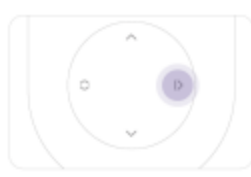
2. Press the right button to turn it on.
3. Open the Aha Halo software on your computer.
Solution 3: Check Device Manager
Scenario A: Driver Installation Failure
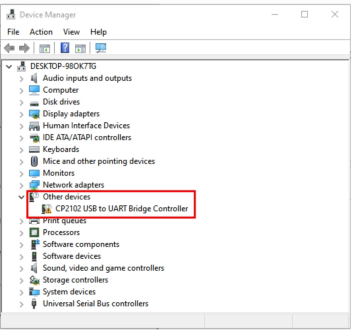
Type in "Device Manager" in the bottom serch bar on your computer screen and open it. Find "Other Devices", and if this icon shows up, then it means driver installation failed.
Scenario B: Computer Automatically Assigned A Port
The computer will automatically allocate an output when Aha’s connected to the computer. For example, COM4. And the default output may not be recognized by Aha, which you can manually select a different output. Click here for step-by-step support.
Solution 4: Mac Users: Update Your OS
Outdated macOS versions can block device recognition. (Has to be Above OS 14.10)
1. Click System Settings → General → Software Update
Download Aha Halo software on another computer and try to connect. If it works elsewhere, your primary computer likely has
Corrupted drivers
Conflicting software
Hardware limitations
Solution 6: Last Resort: Contact Aha Support
If all else fail, please email support@ahaharmony.com withscreenshots of devicemanager errorsand log files (located in the application's installation folder or a dedicated logs directory)and describe the steps you’ve tried.
Bei mir haben alle Tips nicht geholfen, mein Halo Gerät wurde nicht erkannt. Dann fand ich die Lösung: ich habe das USB Hub von Spooky von meinem PC abgezogen, dann das Kabel mit dem Halo Gerät direkt in den PC gesteckt und neu gestartet. Jetzt wird das Gerät erkannt.
Könnten Sie uns bitte ein Bild schicken, das zeigt, dass das Halo-Gerät nicht erkannt wird? Dann kann sich unser Kundenservice mit Ihnen in Verbindung setzen, um das Problem zu lösen. Vielen Dank!
Hi, just wonderful. Thank you so much.
Just turned off the bluetooth on my computer as suggested and it worked immediately. My device is recognized and I can load and delete programs! I had been trying everything for days! (lucky enough, it worked on another computer…. and guess what, I never turn the bluetooth on that one!)
Thanks a million. Have a brilliant day.
Hi, just wonderful. Thank you so much.
Just turned off the bluetooth on my computer as suggested and it worked immediately. My device is recognized and I can load and delete programs! I had been trying everything for days! (lucky enough, it worked on another computer…. and guess what, I never turn the bluetooth on that one!)
Thanks a million. Have a brilliant day.
Hi, just wonderful. Thank you so much.
Just turned off the bluetooth on my computer as suggested and it worked immediately. My device is now recognized and I can load and delete programs! I had been trying everything for days! (lucky enough, it worked on another computer…. and guess what, I never turn the bluetooth on that one!)
Thanks a million. Have a brilliant day.
To provide the best experiences, we use technologies like cookies to store and/or access device information. Consenting to these technologies will allow us to process data such as browsing behavior or unique IDs on this site. Not consenting or withdrawing consent, may adversely affect certain features and functions.
Functional
Always active
The technical storage or access is strictly necessary for the legitimate purpose of enabling the use of a specific service explicitly requested by the subscriber or user, or for the sole purpose of carrying out the transmission of a communication over an electronic communications network.
Preferences
The technical storage or access is necessary for the legitimate purpose of storing preferences that are not requested by the subscriber or user.
Statistics
The technical storage or access that is used exclusively for statistical purposes.The technical storage or access that is used exclusively for anonymous statistical purposes. Without a subpoena, voluntary compliance on the part of your Internet Service Provider, or additional records from a third party, information stored or retrieved for this purpose alone cannot usually be used to identify you.
Marketing
The technical storage or access is required to create user profiles to send advertising, or to track the user on a website or across several websites for similar marketing purposes.
Bei mir haben alle Tips nicht geholfen, mein Halo Gerät wurde nicht erkannt. Dann fand ich die Lösung: ich habe das USB Hub von Spooky von meinem PC abgezogen, dann das Kabel mit dem Halo Gerät direkt in den PC gesteckt und neu gestartet. Jetzt wird das Gerät erkannt.
Könnten Sie uns bitte ein Bild schicken, das zeigt, dass das Halo-Gerät nicht erkannt wird? Dann kann sich unser Kundenservice mit Ihnen in Verbindung setzen, um das Problem zu lösen. Vielen Dank!
Hi, just wonderful. Thank you so much.
Just turned off the bluetooth on my computer as suggested and it worked immediately. My device is recognized and I can load and delete programs! I had been trying everything for days! (lucky enough, it worked on another computer…. and guess what, I never turn the bluetooth on that one!)
Thanks a million. Have a brilliant day.
Hi, just wonderful. Thank you so much.
Just turned off the bluetooth on my computer as suggested and it worked immediately. My device is recognized and I can load and delete programs! I had been trying everything for days! (lucky enough, it worked on another computer…. and guess what, I never turn the bluetooth on that one!)
Thanks a million. Have a brilliant day.
Hi, just wonderful. Thank you so much.
Just turned off the bluetooth on my computer as suggested and it worked immediately. My device is now recognized and I can load and delete programs! I had been trying everything for days! (lucky enough, it worked on another computer…. and guess what, I never turn the bluetooth on that one!)
Thanks a million. Have a brilliant day.