new programs, Product Updates & Innovations

Aha Halo Software Update: Discover the Full JW Peptide Library

Over the past year, the Aha Harmony community has grown into something truly remarkable. Every message, every piece of feedback, and every personal story shared with us has helped shape the direction of Aha Halo.

Throughout this time, your input has been instrumental in evolving Aha Halo into what it is today. Your suggestions, insights, and personal anecdotes have driven us to refine the hardware, broaden the offerings, and push the boundaries of innovation.

This year marks an important milestone for us — the first anniversary of Aha Harmony. And to celebrate it, we are introducing the most significant Aha Halo software upgrade to date.

A New Chapter for the Aha Halo Program Library

In honor of Aha Harmony’s first anniversary, we’re launching our most significant software upgrade to date.

Following eight years of dedicated research, John White and his team have enriched the Peptide Program Library, unlocking an entirely new realm of potential for Aha Halo.

Two Distinct Libraries
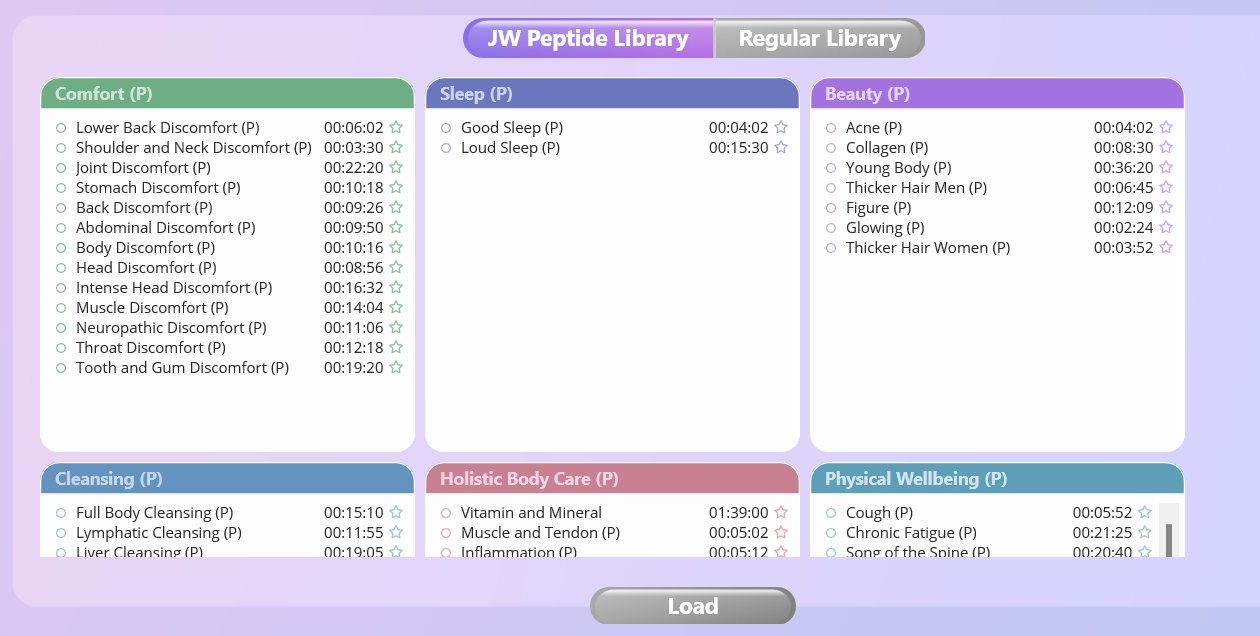
The software is now divided into two program libraries, designed to make discovery easier while offering deeper program options.

Regular Library
Our curated collection of pure frequency programs, each thoroughly tested for effectiveness. It features over 100 top-rated programs organized across 12 categories, making it simple to findexactly what you need.

JW Peptide Library
Specialized peptide programs designed to target specific health challenges at the cellular level. These programs are clearly marked with (P) at the end of their names.

While the JW Peptide Library expands the range of program possibilities, it is important to note that some categories do not include peptide programs. These categories are:

  • Energy Pathways
  • Spiritual Wellbeing
  • Solfeggio

The JW Peptide Library and the Regular Library both address the same health conditions, but they differ in their approach.

For users, this means greater flexibility and the opportunity to explore two different approaches within the same platform.

How to Access the New Programs

1. Connect your Aha Halo to the Computer.
2. Start your Aha Halo software.
3. Find the new programs added to your library.

(If they don’t appear, press “Alt” (Windows) or “Option” (Mac) and click “Software Update” in the left menu.)

Note: You have to quit the software before running the installer for a new version. The update will fail, and the software may not work if you ignore the warning.

If your software still cannot be updated to the latest version, click here.

Note: If you are updating by reinstalling the new Aha Halo software package, please uninstall the previously installed Aha Halo software first.

Start Exploring the New Programs

If you already own an Aha Halo, simply update your software and begin exploring the newly expanded program system.

If you are new to Aha Halo, this update makes it the most advanced and flexible version of the platform yet.

From the established Regular Library to the newly expanded JW Peptide Library, the system now offers more ways than ever to discover programs that align with your wellness goals.

We are deeply grateful for the trust, curiosity, and thoughtful feedback that our community continues to share.

And as always, we look forward to hearing what you discover next.

2 thoughts on “Aha Halo Software Update: Discover the Full JW Peptide Library

  1. Adrian Acuña Kaldman says:

    Hi there my Aha halo new update never opens, it tries to open and then suddnly close….older versions does work but asks for an update… I tried in 2 laptops and in my PC windows 10 and windows 11…they do the same…please fix it!!!

    1. Aha Harmony says:

      Dear, we have fixed now

      🔧 How to get the latest version?
      Please visit our official website to download the latest update:
      👉 https://www.ahaharmony.com/software-download/

Leave a Reply

Your email address will not be published. Required fields are marked *